I had a conversation with someone earlier about configuring digital audio output in context of a stream. The question was: what kind of output levels should you aim for when outputting music to VRChat? I decided to put together my specific version of this answer that I decided for The Magic Video Machine.
The primary motivation for the Video Machine sound system is to be able to playback mixed-origins content (analog from VHS tapes, digital movies or intermission song playback) at normalized levels - so the viewers ideally never have to touch the volume controls during the actual show.
General Design⌗
The principal design of the sound system is shown on the image below. You may have to open it in a new tab to see it in full resolution - I have not configured vector graphics on my blog yet.
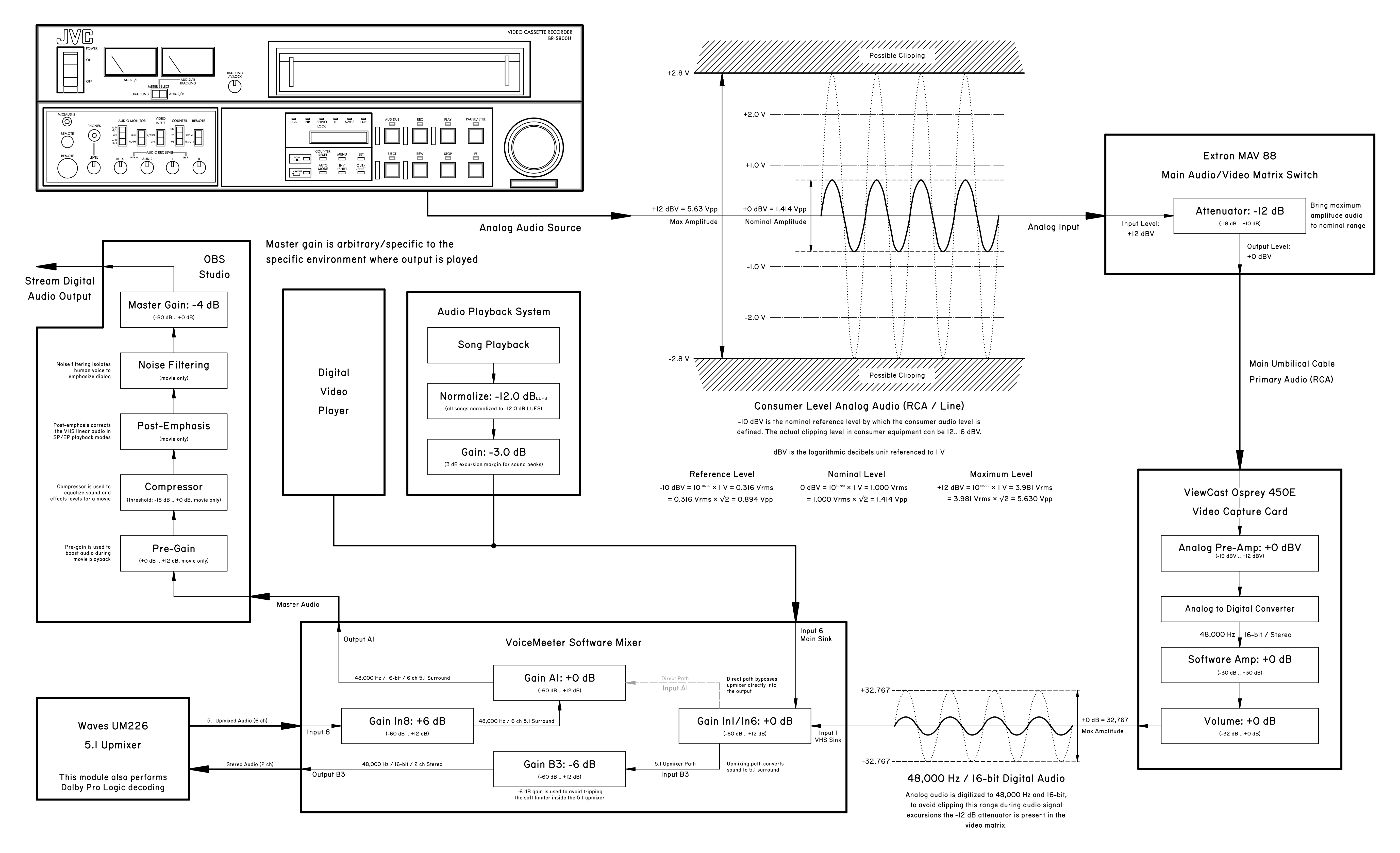
Analog audio travels through the video system at line voltage - unbalanced audio throughout the rack since none of my VCR’s support balanced audio output. Similarly, a line audio input is available on the front panel of the rack.
Because analog audio permits excursion beyond the +0 dBV level (up to +12-16 dBV across the equipment I have, for example) in order to avoid clipping the audio during analog to digital conversion a -12 dB attenuation is added - it brings maximum possible analog signal amplitude back into +0 dBV range.
This assures that even loud audio will be correctly digitized - the analog to digital converter in the capture card accepts signals around +0 dBV and outputs them close to +0 dB as digital data (a simplification). The chance of clipping is largely minimized (in practical terms anyway).
In practice I have observed outputs as high as +6 dBV from the JVC BR-S800U, as well as output up to about +9-10 dBV from the Panasonic AG-W1 (it runs slightly hotter and might have some funny malfunctions). So this is not theoretical - there really is sound data above the nominal level that needs to be digitized properly.
In the context of this post, “dBV” will refer to RMS of the sine wave - non-sine sound signal can have peak excursions beyond the spec, but I use a sine wave for actually diagnosing problems and such with the system. Based on real observed voltages on the VCR’s, there is plenty of margin that I think this simplification is okay.
LUFS Audio Normalization⌗
Now returning to the question asked at the beginning - how to output music to VRChat and what kind of digital processing does it require? My goal has been to normalize perceptual loudness of the music so all of it plays consistently - and I have used LUFS (“Loudness Units relative to Full Scale”).
LUFS is basically an estimate of the perceived loudness of the sound content. It’s derived by calculating the sound spectrum and combining it with the known (idealistic) response curve of the human ear. The result is that LUFS is a measure of perceived sound energy - it accounts for different sensory perception of different frequencies.
Video Machine uses a target of -15.0 dB LUFS (originally conceptualized as a -12.0 dB LUFS target with additional 3.0 dB of overshoot margin). This means that for example if a song measures -9.0 dB LUFS during analysis, the final gain applied to it before playing on the output will be:
$$FinalGain = Target_{LUFS} - SongMeasured_{LUFS} =$$ $$= -15.0 \space dB - (-9.0 \space dB) = -6.0 \space dB$$
Why the extra margin? Because the exact relationship between LUFS (perceptual loudness) and the actual peaks in the audio data is not linear or trivial - it is highly dependent on the music genre (which instruments are used and how), on the way it was mixed, on any compression or clipping in the source song data. In particular, low-frequency drums tend to contribute less to perceptual loudness while having fairly high peaks in the sound data.
The primary constraint of the output is that once sound peaks in digital audio exceed +0 dB, they begin clipping. There is simply no bit width left to represent sound samples at that amplitude. So, the total gain applied to the sound data should preferably not cause any clipping.
I’ve heard a suggestion of using -10.0 dB as a LUFS target, however that is exceedingly narrow. Let me show you some of the real music that can play at the video machine.
A particular detail is that all of these songs contain peaks of +0 dB, they use the full numerical range of the 16-bit sound data. The choice of -15.0 dB LUFS is a particular reflection of the wide variety of music genres that play during the Video Machine shows.
First, an example of of pop music, characteristic with a fairly high degree of compression. Measured LUFS is -9.0 dB, resulting in -6.0 dB total gain - no clipping happens whatsoever with a hefty margin:
 (if LUFS target was -10.0 dB, the resulting gain would be -1.0 dB - no clipping)
So far so good. But now an example of a hip-hop beat, with presence of some low drums. Measured LUFS is -12.5 dB, resulting in -2.5 dB total gain - no clipping happens with a decent margin:
 (if LUFS target was -10.0 dB, the resulting gain would be +2.5 dB and considerable clipping would occur!)
Now an EDM track. Measured LUFS is -13.1 dB (heavy use of low drums!), resulting in -1.9 dB total gain - no clipping, but the margin is shrinking:
 (if LUFS target was -10.0 dB, the resulting gain would be +3.1 dB and we would start eating away at the drums)
A meme song with very pronounced beats… Measured LUFS is -14.7 dB, which gives a -0.3 dB gain with almost no margin:

And finally another hip-hop type track. This one is exactly the edge case which made me add that extra 3 dB on top of the 12 dB margin I selected at first. Measured LUFS is -18.7 dB (!!), which results in +3.7 dB gain and clips the tops of the drums!

It’s not a considerable issue, but most of these drum hits end up clipping or hitting a limiter. This is one of the very very few tracks in my library that actually experiences this, thankfully the duration of these segments is fairly low:
 (and with a -10.0 dB target, the drums become genuinely distorted with +8.7 dB gain despite the song overall not sounding all that loud).
The partly-implemented way to handle this song that I chose is to simply soft-limit the peaks, resulting in little perceptual distortion. Most songs in my library end up with peaks reaching -3.0 dB, some getting up to -1.5 dB and very very few having short moments above those.
Note that all these songs would be playing at the same perceptual loudness - they would sound about equally. However depending on the choice of the normalization target, some of their data may get clipped.
Of course, you could just compress the excess excursions… but classic rock, hip-hop music and other kinds of music with pronounced drums would suffer. As a point of interest, Apple Music normalizes loudness of the songs to -16.0 dB LUFS, while Spotify uses -14.0 dB LUFS target (-11.0 dB in the “loud” mode).
Hopefully the choice makes sense - while most music fits in the narrow range, there exists a decent amount of songs with excursions in the waveform amplitude (mostly drums) that are unusually high.
So the final answer is… you need to normalize the sound output to at least something like -12.0 .. -15.0 dB LUFS - this allows you to represent a wide variety of music without significant distortion. By default, OBS only shows RMS of the sound signal which can be used as a general guidance (see below), however I would also recommend using something like this plugin (obs-loudness-dock).
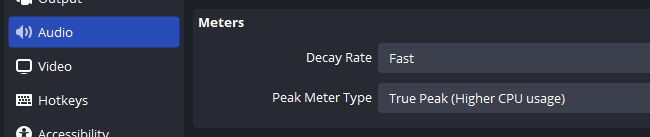
First of all, make sure that true peak is displayed, otherwise the VU meters are slightly more unpredictable with relation to the sound data:
Here is an example of a song with nice drums somewhat similar to the waveform examples shown above:
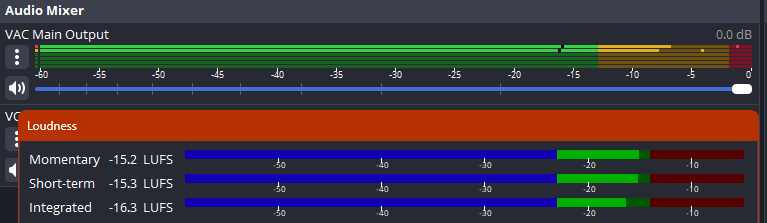
The actual VU meter jumps around a fair bit, however take note of the position of RMS dashes (black dashes on OBS VU meter), as well as position of peak indicators (glowing rectangles on the VU meters which move when new peaks are recorded).
For my chosen -15.0 dB LUFS target, the rule of thumb is the following (remember, it’s all listed relative to the True Peak measurement mode):
- The peaks should tickle at the start of the red area (-3.0 dB and higher) - they should generally reach the -3.0 dB level, possibly slightly above it - with excursions beyond -1.5 dB being on the uncommon side.
- The peaks generally move around around -6.0 dB level, specifically wiggle between -9.0 dB and -3.0 dB (purely an eyeballing heuristic). They are confidently in the middle/upper middle of the yellow area (-15 dB to -3 dB) during the main sections of the song
- RMS meters should usually sit somewhere between -20.0 dB and -15.0 dB
This is just a heuristic and not a strict rule - there is a reason that LUFS exists, since true loudness normalization cannot be done purely by the usual VU meters. Of course, if you have a LUFS loudness meter, then you just aim your short-term readout towards -15.0 dB LUFS (or whichever other target you pick, for example -12.0 dB is also a reasonable target for vast majority of the music in my sampling).
Songs will have loud segments and they will have quiet segments. The best normalization would have to be done by pre-analyzing the songs probably… but the loudness meter is a nice way to double check it.
This specific approach to loudness has been serving me pretty well - both for a large variety of different music and for playing movies which contain a mixture of background noise, dialog and very loud foreground effects. The 3.0 dB margin comes into play here as well - the compressor and pre-gain are configured so human dialog generally ends up comparable to music in loudness, with some of the louder effects sitting in that upper 3.0 dB margin - being notably loud, but not ear piercingly so.
And as an additional note - the final step of the video machine sound output is applying a -4.0 dB gain offset. All sound processing in OBS is done in floating point, so this is a way to match the loudness to what fits comfortably the music player in the VR world as well as gather a little bit of extra loudness margin for free. This -4.0 dB offset is arbitrary and isn’t part of the design of the sound system - it’s the free variable for adjusting sound on the fly. A couple dB up, a couple dB down can make a lot of difference - LUFS isn’t perfect and everyone’s ears are different.